Solo inspection business
Field reliability, the only software spec that matters at 2 pm
How to evaluate inspection software for real-world reliability, the four drills that expose weak tools, and the data habits that make failures survivable.
By Owen Murray, founder of InspectorKit · Updated July 6, 2026
Every inspection tool is reliable in the demo. The demo happens on office wifi, with a three-item checklist, on the sales engineer's phone. Your Tuesday happens in a 1962 ranch with a wet crawlspace, 41 findings, 130 photos, and a phone at 40 percent, and the gap between those two environments is where inspection software actually gets graded.
Reliability is not a feature on the comparison chart. It is the property that decides whether the features exist when you reach for them, and it can be tested before it is trusted.
What failure actually costs
Price the failure before evaluating the safeguards. Losing an afternoon of findings does not cost an afternoon, it costs the re-walk if the house is still accessible, the client-visible delay when it is not, the turnaround reputation either way, and a permanent tax on your attention, because an inspector who has been burned starts double-checking saves forever, and that vigilance is workflow drag that never leaves.
That asymmetry is the whole argument for front-loading the evaluation. Twenty minutes of deliberate abuse before the purchase beats any amount of vendor reassurance after it.
The four drills
Run these on your actual field device, with a practice inspection, before real work rides on the tool.
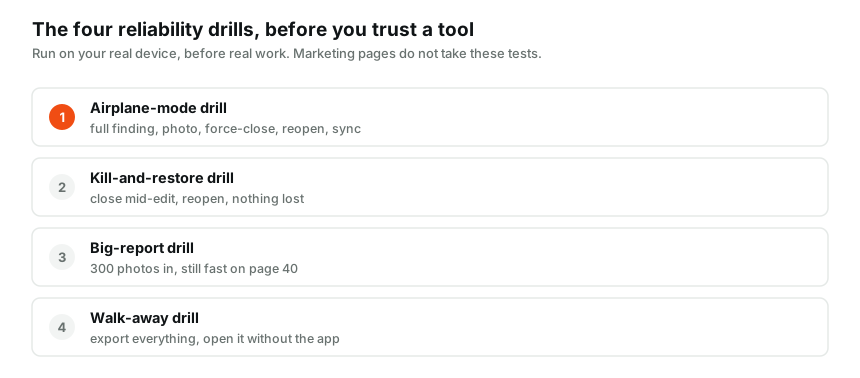
The airplane-mode drill tests the offline spine. Full finding, condition, narrative, photo, annotation, all with the radio off, then force-close, reopen still offline, verify, restore signal, and watch the sync drain without your help. The offline deep-dive covers why this one is non-negotiable for a tool that visits basements.
The kill-and-restore drill catches the silent-loss class. Mid-edit, half a narrative typed, swipe the app dead. Reopen. A field-grade tool shows you the half-typed narrative, because it was writing locally as you worked. A demo-grade tool shows you the last graceful save, and the difference is exactly what gets discovered at report-assembly time on weaker tools.
The big-report drill tests scale honesty. Load a practice inspection to realistic weight, hundreds of photos, every section touched, then navigate, search, and edit on page 40. Tools tuned on small demos develop lag precisely at the size real jobs reach, and lag in the field quietly pushes you back toward paper notes.
The walk-away drill tests the exit. Export everything, reports, comment library, template, and open the exports without the app. If the data leaves in usable shape, vendor risk drops from existential to inconvenient. If it does not leave, or leaves mangled, you have learned the tool's real opinion about who owns your work, and the data-ownership question deserves settling before the relationship, not during the divorce.
The architecture tell, one question for any vendor
Behind all four drills sits one architectural question worth asking directly, where does my edit live in the second after I make it. The answer you want is on the device, immediately, with the cloud catching up whenever it can. The answer that fails Tuesdays is in memory until we sync, which converts every signal gap and every crash into a gamble.
InspectorKit is built device-first for exactly this reason, every edit lands in local storage the instant it happens, a queue carries changes up when connectivity allows, and the sync badge tells you the queue's state at a glance. Not because crashes are frequent, but because the design assumption should always be that phones die, apps get killed, and signal lies.
Surviving anyway, the habits layer
No tool earns unconditional trust, so a thin layer of habit sits on top of even a good one.
Glance at the sync indicator at the truck, once per job, the two-second confirmation that the queue drained before you drive away from the property. Keep the yearly export ritual, the walk-away drill run for real, filed locally with the tax records. And after any major app update, spend five minutes re-running the kill-and-restore drill, because updates are where regressions enter and five minutes is cheap insurance.
None of this is paranoia in practice. It is the same posture the rest of the kit already gets, the ladder gets inspected, the moisture meter gets calibrated, and the software gets drilled. Field equipment earns trust through testing, and the report tool is field equipment before it is anything else.
Battery, the reliability constraint nobody drills
One physical variable rides along with every software question, the phone's battery, because the most reliable app in the world is a brick at zero percent. Field reliability planning includes the boring kit answer, a cable in the truck and a small power bank in the tool bag, and it includes a software preference too. Apps differ meaningfully in battery appetite, and heavy camera use plus constant sync retries on weak signal is the hungriest combination. A tool that batches its sync attempts instead of hammering a dead connection is quietly kinder to the battery that the afternoon's second inspection depends on. Watch your battery graph across a few full inspection days, and if the report app is the top consumer by a wide margin, that is data about its engineering.
Reliability as a purchasing filter
Put reliability first in the evaluation order and the shortlist reorders itself. Features are negotiable, a missing nicety costs a workaround. Reliability is not, a failure costs jobs and reputation, the two assets a solo business cannot buy back. So run the drills before the purchase, re-run them yearly, keep the export habit, and pick the tool whose architecture assumed your Tuesday instead of its own demo. Everything else on the feature chart is decoration on top of that foundation.
Common questions
What is the most common reliability failure in inspection apps?
Silent partial loss. Not the dramatic crash, the finding that looked saved and was not, discovered while assembling the report. It is why the drills below force-close the app mid-work, because graceful shutdowns are what demos rehearse and ungraceful ones are what Tuesdays deliver.
How much should vendor stability factor into the choice?
As a real line item. Tools get acquired, sunset, and re-priced, and your reports need to outlive all of it. You cannot predict a vendor's future, but you can require an export path today, which converts vendor risk from existential to inconvenient.
Do I need to re-run the drills after picking a tool?
Once a year is plenty, or after any major app update. The point of the drills is establishing trust before the stakes are real. After that, the daily sync indicator and the yearly export habit carry the monitoring load.