Your setup
Import your comments in one paste
Move years of saved narratives from a document or your old software into the InspectorKit library with the bulk paste importer.
By Owen Murray, founder of InspectorKit · Updated July 6, 2026
Your comment collection is probably the single most valuable thing trapped in your old workflow. Here is how it moves.
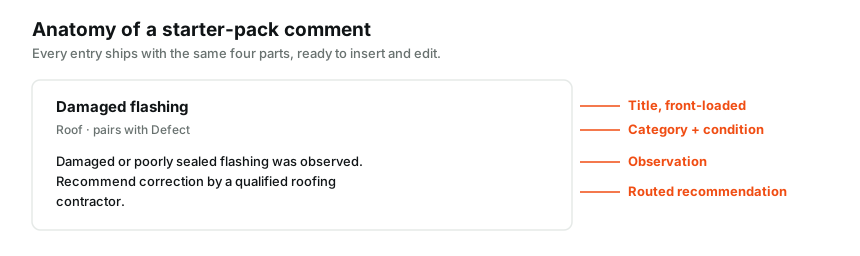
Get your text out
From a document, copy it. From old software, find the export or copy narratives from a few recent reports, which usually captures your working vocabulary faster than a formal export does.
Shape barely matters. The importer wants blocks of text separated by blank lines, where the first line works as a title. A collection that looks like this imports perfectly.
Roof flashing damaged
Damaged or poorly sealed flashing was observed at the roof plane.
Recommend correction by a qualified roofing contractor.

Gutters need cleaning
Debris was visible in the gutters at the time of inspection.
Recommend cleaning and verifying downspout discharge.
Run the import
Open the Library page and choose the bulk import option. Pick the category and condition that apply to the batch you are pasting, paste, and confirm. Every block becomes a saved comment with your title, your body, and the batch settings attached.
Big collections go smoothest in a few passes sorted by condition. Paste the defects together, then the safety items, then the marginal language. Each pass takes seconds.
What a good title looks like
Titles carry the whole scanning experience. Roof flashing damaged beats Comment 14, and Water heater TPR valve missing beats plumbing note. Write the title you would want to see while standing in a basement with a client waiting upstairs. Bodies can be long, titles cannot.
Clean up once, benefit forever
After importing, scan the list for five minutes. Fix any title that will not make sense on a job site, delete duplicates, and confirm conditions landed right. The library page covers ongoing management.
From the next inspection onward, your own language is the one-tap option in the builder, sitting alongside the starter pack instead of in a document you have to alt-tab into.
When the pile is too big to want to touch
Some migrations are a decade deep. If sorting old exports sounds like a weekend you do not have, the Done-For-You setup covers it. You send whatever you have, in whatever shape it is in, and your account comes back with the library rebuilt and checked.
Common questions
What format does the paste need?
Plain text blocks separated by a blank line. The first line of each block becomes the comment title and the rest becomes the body. No spreadsheet gymnastics required.
What if my comments have different conditions mixed together?
Import in passes. Paste your defect language with Defect selected, then your marginal language with Marginal selected. Two minutes of sorting in your document saves editing every entry after.
I have hundreds of comments in my old software. Is paste really the way?
For a big migration the Done-For-You setup exists exactly for this. Send the export and the whole library gets rebuilt and checked for you.