Your setup
The comment library
How saved narratives work, what ships in the starter pack, and how the library becomes your own voice over time.
By Owen Murray, founder of InspectorKit · Updated July 6, 2026
Every inspector I have talked to has the same asset somewhere. A Word document, a notes app, a folder of past reports they raid for language. Years of carefully worded findings, none of it one tap away when standing in the actual house.
The library makes that asset operational.
What ships with your account
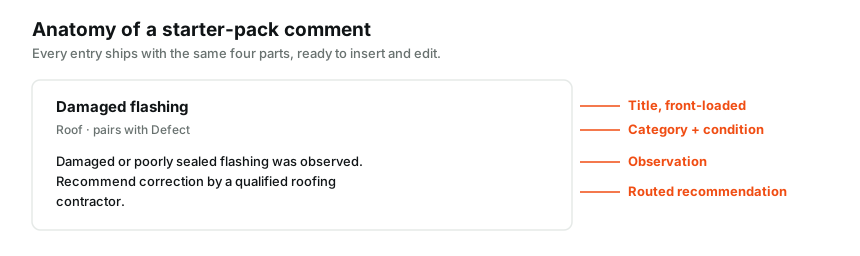
A starter pack of 65 field-tested narratives comes pre-loaded, organized by system and severity. Roof, exterior, plumbing, electrical, HVAC, interior, attic, garage, with language for defects, marginal conditions, safety items, and clean functional entries.
They are written the way a careful inspector writes. Observation first, implication second, recommendation last, and no wording that promises more than an inspection can. Use them as-is on day one or treat them as scaffolding for your own versions.
Using comments in the builder
The library panel sits on the right side of the builder, filtered to be useful for the item you have open. One tap inserts the narrative into the current finding. Edit it there to match the actual house, and nothing you change touches the saved version.
When an edited narrative comes out better than what you started with, tap Save current comment. It joins your library with the condition and category already attached, and next week it is the one-tap option.
Condition matters as much as text
Every saved comment carries a condition, and the builder uses it to surface relevant language faster. A narrative saved under Defect shows up when you are working a defect. Save sloppy and the library gets noisy. Save with the right condition attached and the panel starts reading your mind on site.
Managing the collection
The Library page in the top navigation is the full manager. Search everything, filter by condition, edit your entries inline, delete what you have outgrown, and duplicate starter pack entries into editable copies.
Two habits keep a library sharp. Save aggressively for a month, then prune once. And write titles you can scan in two seconds, because on site you find comments by title, not by body text.
If your language currently lives in a document from your old software, the import guide moves it over in one paste. And like everything you build here, the collection exports as a clean PDF whenever you want a copy that lives outside the app.
Common questions
Can I edit the starter pack comments?
Starter pack entries are read-only so they stay a reliable reference, but any of them can be duplicated into your own library with one tap and edited freely from there.
Do library changes sync across devices?
Yes. Save a comment on your laptop tonight and it is on your phone at tomorrow's inspection.
Is there a limit on saved comments?
No practical one. Build the library as deep as your specialties go.