Report writing craft
Annotating inspection photos, the circle that does the explaining
Why marked photos change how findings land, what to draw and what to skip, and the annotation habits that keep evidence clean for every future reader.
By Owen Murray, founder of InspectorKit · Updated July 6, 2026
A buyer cannot see what you see. That sentence is the entire case for annotation, because the water stain that reads as obvious to a trained eye dissolves into ceiling texture for everyone else, and a photo that fails to communicate is evidence in theory only. The drawn circle is the cheapest translation layer in your whole report, and like every part of report craft, it has a discipline.
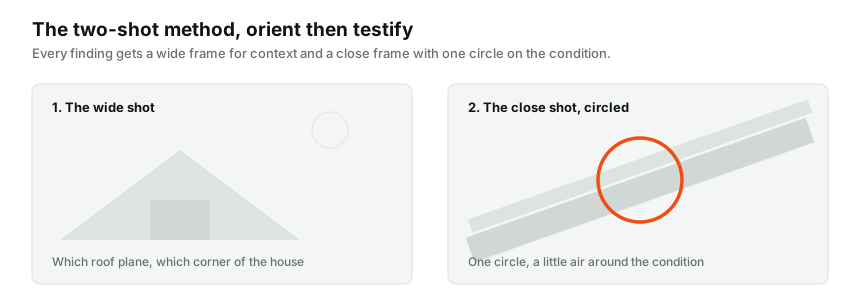
What the circle actually does
An annotation converts a photograph from a scene into a statement. Unmarked, the photo says here is a roof. Circled, it says here, precisely, is the thing I am telling you about, and the reader's eye lands where your expertise pointed.
The effect compounds with the two-shot habit from the photo evidence guide. The wide frame orients, the close frame with its circle testifies, and together they let a reader at a dinner table understand a finding as clearly as an agent between showings or a contractor writing a bid. The marked photo also sticks to the exact finding it documents in the report body, so the circle, the narrative, and the condition label arrive as one unit, which is what makes the evidence durable.
What to draw, and what to leave alone
The default mark is a single circle around the condition. One finding, one circle, drawn with a little air around the subject so it frames rather than obscures.
Resist the urge to add more. Multiple circles on one photo usually mean multiple findings sharing one image, which deserve separate photos with separate narratives instead. Arrows earn their place occasionally, when direction itself matters, water flowing toward a wall, a slope reading, but they assert more than a circle does and need matching narrative support. And text burned onto the image, labels, verdicts, exclamation marks, is almost always a mistake, because the photo now says something permanent in language less careful than your narrative discipline writes.
The rule underneath all of it, the drawing points, the narrative speaks. Any markup doing the narrative's job is markup working outside its qualifications.
The mechanics, done in the field
Annotation that waits for the evening never happens consistently, so the working habit is mark-at-capture. Shoot the close frame, open it, draw the circle while standing at the finding, and move on. On InspectorKit the annotate flow opens straight from the photo on the item, saves the markup with the image, and shows a Marked badge so a glance tells you which evidence is finished. The whole gesture costs maybe eight seconds, and eight seconds at the finding beats five minutes of guessing at a laptop.
Marking at capture also fixes accuracy in a way memory cannot. You are circling what you are looking at, not what you think you remember photographing, and on the fourth house of the day that distinction is the difference between evidence and approximation.
Annotation and the dispute reader
The rare bad future deserves a paragraph, because annotation behaves well in disputes precisely when it followed the discipline above.
A circled photo attached to a three-part narrative is a strong exhibit. It shows what you saw, where, with your contemporaneous explanation in careful language beside it. The same photo with DANGER scrawled across it, or a label diagnosing the cause, hands the room a claim your narrative never made and your qualifications may not support. Point with the circle, let the narrative testify, and your photos remain the co-author your report wants, per the one-voice principle the liability guide closes on.
There is a quieter dispute benefit too. The annotated baseline. A circled crack with a scale reference, timestamped in a published report, is the comparison point every future monitoring question measures against, which turns your markup into the protocol the foundation monitoring language relies on.
Color and weight, the small choices
Markup legibility has two settings worth fixing once. Draw in a color that survives every background, and a warm high-contrast tone holds up against roofing, drywall, and dark crawlspace frames alike, where pale or cool colors vanish into half the surfaces in a house. Keep the stroke weight readable at phone size, since most readers meet your photos on a six-inch screen, and a hairline circle that looked precise on your laptop disappears entirely in a text-message forward. Test once by viewing a marked photo on your own phone at arm's length, and whatever settings pass that glance are your settings forever.
When the finding resists a single circle
Some conditions spread, and the markup should adapt without cluttering. A stain field across a ceiling reads best with one circle at the worst concentration and a narrative that names the extent, staining across approximately four square feet, rather than five circles competing for attention. A crack with a direction gets the circle at its widest point and, where direction genuinely matters, one arrow along its run. And a pattern finding, repeated nail pops, systematic gaps, gets one representative close-up circled plus a wide shot showing the repetition, with the narrative carrying the word multiple. The markup stays minimal, the words carry the scope, and the photo remains readable at a glance, which was the whole point of drawing on it.
The habits, compressed
Circle the close shot of every finding, one circle, a little air around the subject. Skip markup on context frames, data plates, and clean-condition photos. Save arrows for direction, spend them rarely. Never burn words onto images. Mark at capture, at the finding, in seconds. And once per report, flip through the marked photos asking whether each circle points at exactly what its narrative describes, because that agreement is what every future reader, friendly or otherwise, will check.
The circle is eight seconds of drawing that saves every reader a minute of hunting and saves you every conversation that starts with which stain do you mean. Cheap, fast, and quietly the most client-friendly stroke in your whole workflow.
Common questions
Does every report photo need annotation?
No. Mark the close shot of each finding, where the condition needs pointing out to an untrained eye. Wide context shots, data plates, and affirmative photos of clean conditions usually read fine unmarked.
Circle, arrow, or text on the photo?
The circle wins almost every time. It points without asserting, prints cleanly, and leaves the explaining to your narrative where the careful language lives. Text burned onto photos is the riskiest option and rarely necessary.
Can annotation hurt me in a dispute?
Only if the markup makes claims the narrative avoids. A circle says look here. A scrawled label saying code violation says something your report was carefully not saying. Point with the drawing, speak with the narrative.