Switching and migration
Switching software without losing your reports, the archive doctrine
The fear that keeps inspectors on disliked platforms is losing report history. How to build a bulletproof archive, verify it, and field callbacks after.
By Owen Murray, founder of InspectorKit · Updated July 6, 2026
Ask inspectors why they stay on software they complain about and the honest answer under the answers is fear of losing the trail. Years of delivered reports, the record that protects them from every callback and claim, feels welded to a vendor's servers. This guide is the unwelding, a doctrine for making your report history yours before, during, and after any switch.
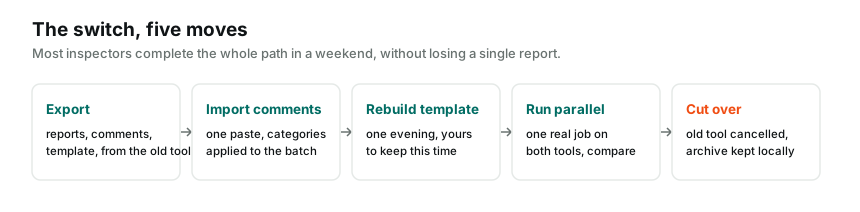
The reframe, reports are records, not cargo
The instinct that makes switching feel dangerous is imagining old reports must somehow move into the new tool. They must not, and understanding why dissolves most of the fear.
A delivered report is a frozen record of what you observed on a date. It will never be edited again, because editing a delivered report is how inspectors manufacture liability. Records belong in files, PDFs in your own folders, organized by year, findable in minutes. Your new software's job is the next hundred reports, not warehousing the last hundred, and the ownership doctrine applies regardless of which tools bookend the switch.
The one exception that proves the rule is the re-inspection, where a past visit needs a working sequel. That bridge is a fresh report referencing the archived one, and on InspectorKit the re-inspection flow handles the working side while your PDF handles the record side.
Building the archive, the one session that matters
The archive session happens while your old subscription is alive, and it is the only genuinely non-negotiable step in any switch.
Pull report PDFs by whatever door your platform offers, per-report buttons, a Drive backup, or a support request, with the Spectora-specific map covering that platform's uneven doors. Triage if bulk is impossible, recent years complete, contentious findings forever, repeat clients always. Name files so future-you wins, date and address in every filename, sorted into year folders, since the 2031 callback question will arrive with an address and a rough year attached.
Then store it like the business asset it is. One copy on your machine, one in the cloud storage you already trust, and the whole folder living wherever your tax records live. Boring, and boring is what liability protection is supposed to feel like.
Verification, the step everyone skips
An unverified archive is a hope, not an archive. Before canceling anything, run the test that makes it real.
Open the folder on a device that has never logged into your old platform, a spouse's laptop qualifies, and spot-check a dozen files across the years. Full report renders, photos included, summary intact. Confirm your oldest liability-relevant year is present, confirm the naming survives a search by address, and confirm the cloud copy actually synced. Twenty minutes, and the switch's scariest question is answered with evidence instead of assumption.
Only after verification does the cancellation step belong on any calendar. Access ends when payments end, and archives get built through doors that are still open.
The special cases, agreements and photos
Two asset types deserve their own line in the doctrine. Signed agreements and contracts, if your old platform stored them, are legal records with their own retention logic, so pull them alongside the reports and file them with the same discipline. Original photos beyond what the report PDFs embed are usually overkill to archive separately, since the delivered report is the record of what you showed the client, but any originals attached to contentious findings are worth the extra pull. When in doubt, the test is simple, would you want it in hand during a dispute deposition. If yes, it goes in the folder.
Fielding the after-switch callback
The scenario the fear was always about arrives eventually. A client from three years ago calls with a question, or worse, a dispute. Here is how it plays with the doctrine in place.
You search the year folder by address, open the PDF, and read your own findings from that date, exactly as delivered. If they need a copy, you send the file. If their old hosted link died with your old subscription, it does not matter, because the document was never only a link. Your answer arrives in minutes, sounds like a professional with records, and costs nothing, which is the entire return on the archive session.
Contrast the alternative, discovering at callback time that your access lapsed and the vendor's retention window closed last spring. That inspector is negotiating for their own work product at the worst possible moment. The difference between the two scenarios was one organized evening, years earlier.
A word on formats and the twenty-year test
Archive quality is format quality. PDFs pass the twenty-year test, they will open on whatever machines exist in 2046, which is inside the window a career's liability tail can run. Avoid archiving in any platform's proprietary bundle, since those files are backups only in the presence of the software that made them, and the software's presence is exactly what a switch ends. If your old platform offers both, take the PDF every time, and if it offers something exotic, convert while conversion is one click instead of a support ticket to a company you no longer pay.
Going forward, never rebuild this fear
The last piece is making sure the next platform never accumulates the same hostage situation. Two habits do it.
Save a PDF of every report at delivery time, thirty extra seconds via the publish flow's print button, straight into the current year folder. And run the quarterly export ritual, reports plus template plus library, so your files trail your business by at most ninety days forever.
On InspectorKit those habits are deliberately easy, and the incentive to keep them easy is structural, a one-time purchase gains nothing from holding your history. But the doctrine is bigger than any vendor, this one included. Your reports protect your license. Custody of them belongs with the person whose name is on every page, and after one good archive session, it finally is.
Common questions
Do my old report share links keep working after I cancel?
Assume no. Hosted links live on the vendor's servers, and access policies after cancellation vary and change. Your archive of PDFs is the durable copy, and anyone who needs an old report gets the file, not the dead link.
Do old reports need to move into my new software?
No, and trying is usually wasted effort. Old reports are records, not working documents. They belong in your files as PDFs. Your new tool is for the next report, and only re-inspections ever bridge the two eras.
How far back should my archive go?
All of it if the platform makes that feasible, and a triaged set if it does not. Recent years for liability timelines, contentious findings forever, repeat clients always. The data ownership guide covers retention reasoning in depth.