Switching and migration
How to switch home inspection software without losing a step
The three assets that must survive any migration, the parallel-month method, and a week-by-week playbook that keeps clients from noticing anything.
By Owen Murray, founder of InspectorKit · Updated July 6, 2026
Software switches fail in the imagination more than in practice. The mental image is a weekend of chaos, lost templates, and a stretch of embarrassing reports. The reality, run properly, is an evening of setup, a month of quiet parallel running, and a cancellation email. This is the playbook for the proper version, tool-agnostic where it can be and specific where it helps.
First, name what actually has to move
An inspection business's software holds exactly three irreplaceable assets, and everything else is furniture.
The report archive protects you from callbacks and claims, and it moves as PDFs. The template encodes your walk order and coverage, and it moves as structure you rebuild or import. The comment library carries your accumulated judgment, and it moves as text. Client contact history is worth grabbing too, though your inbox and invoices usually duplicate it.
Notice what is not on the list. Settings, integrations, automation recipes, portal configurations. Those feel like assets because they took time, but they are furniture arranged for the old house. The move is about the three things above, which shrinks the job considerably.
The parallel month, the only method that never burns anyone
Cold cutovers are how switches become stories. The alternative costs one extra month of the old subscription and removes every risk worth worrying about.
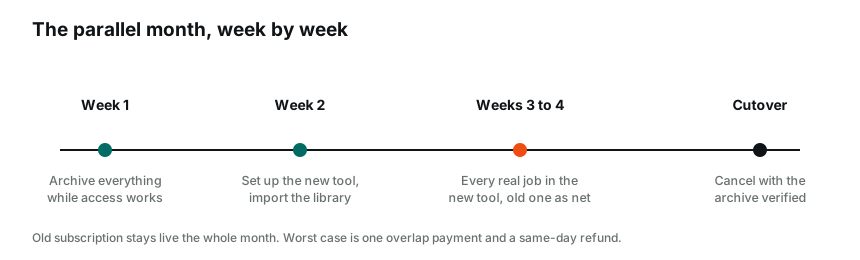
Week one is archive week. Export everything from the old platform while your login is healthy, report PDFs, template, comment collection, per the Spectora-specific walkthrough if that is your platform. Nothing else happens until the archive sits in your own folder, because leverage and options both live there.
Week two is setup week. Configure the new tool in an evening. On InspectorKit that means branding, a first pass at the template, and pasting your comment collection through the importer, or skipping the labor entirely by sending the archive to the Done-For-You setup. Run the practice environment until the field loop feels familiar.
Weeks three and four are the actual test. Every real inspection gets built in the new tool, and the old subscription sits as your safety net, not your workflow. Send a new-tool report to a friendly agent and ask for a gut reaction. By the fourth job the comparison has stopped being hypothetical, and you have real evidence about speed, output quality, and your own evenings.
Then, and only then, the cancellation email, with your archive already safe and your muscle memory already moved.
Timing the month wisely
Not all months are equal switching material. Pick an overlap month with normal volume, busy enough to generate the three or four real test jobs, calm enough that a twenty-minute learning curve per job costs patience instead of deadlines. Avoid your market's peak season opener and the week before a vacation. Annual-plan holders get their timing chosen for them, work backwards from the renewal date and finish the parallel test with two weeks of margin, so the go or stay decision never gets made under a countdown.
The failure modes, so you can skip them
Four patterns account for nearly every bad switch, and all four are avoidable on purpose.
Canceling before archiving is the classic, covered above, and worth repeating because annual-renewal panic causes it. Perfectionist template rebuilding is the sneaky one, three weeks tuning sections before running a single job, when two real inspections teach more about your template needs than any planning session. The double-entry trap, building every report in both tools all month, doubles your workload and proves nothing the fourth job would not have proven. And the silent-struggle pattern, fighting a confusing corner of the new tool for days instead of sending one support email, wastes the exact week the parallel month was designed to protect.
A note on that last one. Support responsiveness during your switch is the best preview you will ever get of support responsiveness forever. Use it, and grade it.
What switching costs, honestly
The full economics get their own treatment in the switching costs breakdown, but the shape fits in a paragraph. One overlap month of subscription, an evening or two of setup, a handful of jobs at learning-curve speed. Against that, the recurring difference between rental and owned pricing, which for the market's flagship runs about $1,300 a year, every year, per the cost table.
The asymmetry is the point. Switching costs are one-time and shrinkable, staying costs are annual and growing, and the Done-For-You setup exists to shrink the one-time side to nearly zero for inspectors whose archives are deep or whose evenings are spoken for.
After the cutover, the thirty-day settle
The switch does not quite end at cancellation, so budget a light settling period. Keep the archive folder pinned where you can reach it for the occasional old-report question. Expect two or three template tweaks as jobs surface small gaps, five minutes each in the editor. Save aggressively to the library as your language finds its new home, per the library habits guide. And send yourself one published report as a client would receive it, on a phone, as the final quality gate. By day thirty the new tool is simply the tool, and the old platform is a line item that stopped appearing.
The switch, compressed to a checklist
Archive everything while access is healthy. Set up the new tool in one evening, importer or DFY for the library. Run every real job through it for two to three weeks with the old platform as the net. Grade the reports, the speed, and the support against your old normal. Cancel with your files in your own folder and your renewal date beaten by a comfortable margin.
Run that sequence and the scary version of switching never materializes. The month ends, the meter stops, and the only person who noticed anything was the one whose evenings came back.
Common questions
How long does a real switch take?
One overlap month is the honest answer for a careful solo inspector. Setup and imports fit in an evening or two, and the rest of the month is running real jobs in parallel until the new tool has earned the cutover.
Should I tell my clients or agents I switched?
They should only notice if the reports got better. Your branding carries over, your delivery flow carries over, and the document is the only thing they ever saw. A well-run switch is invisible from the outside.
What is the most common switching mistake?
Canceling the old platform before archiving it. Access ends when payments end, so every export happens while the subscription is alive, and cancellation is the last step of the plan rather than the first.