Switching and migration
Getting your data out of Spectora, what exports exist and what does not
Per Spectora's own docs there is no bulk report download. What you can export, the workarounds for what you cannot, and the order to do it all in.
By Owen Murray, founder of InspectorKit · Updated July 6, 2026
Leaving any platform starts with an inventory of the exit doors, and Spectora's are worth mapping precisely because they are uneven. Some assets walk out cleanly, some need a workaround, and one important door is, per their own documentation, not there. This guide maps all of it, as of July 2026, so your archive session is a checklist instead of an exploration.
Report PDFs, one at a time
Individual report downloads work fine. Each web report carries a PDF button, and their support center documents the flow plainly. For any single report, you are two clicks from a file.
The catch is plural. Spectora's documentation states directly that you cannot mass-download all PDF reports at once. Their suggested paths are a Google Drive backup integration and a feature request for mass download that users can vote on. For an inspector with a few hundred reports, that turns a bulk export into either a Drive-sync project or a long afternoon of clicking.
Practical guidance, in order of preference. Set up the Google Drive backup if you have any lead time, and let it accumulate your archive automatically. If you are archiving manually, do not attempt completeness, triage instead. Every report from the past 24 months, any report with a known contentious finding, and any report for a repeat client. Statute-of-limitation realities make recent reports the liability-relevant ones, and the data ownership guide covers retention reasoning in depth.
Start this door first regardless of method, because it is the slowest one.
What the Google Drive route actually gets you
The Drive backup deserves a closer look since their docs position it as the bulk answer. Once connected, reports flow to your Drive as they publish, which is genuinely useful going forward and worth enabling on day one, not exit day. Its limitation is direction, backups accumulate from setup onward, so a connection made during your archive session may not reach back through your history. Check what actually landed in the folder before treating it as complete, and fill gaps with the triaged manual downloads. An archive is only as real as its oldest verified file.
The template, a real export
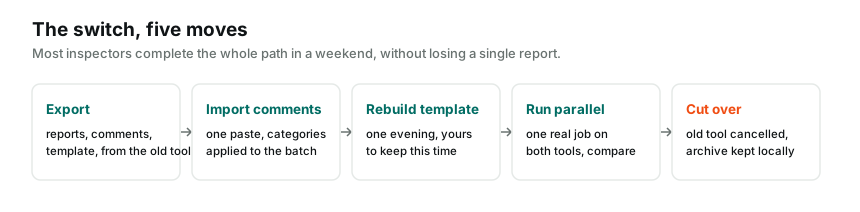
Good news on this door. Spectora's support center documents a template export, and it works as advertised. Run it, keep the output with your archive, and treat it as the blueprint for your next tool's structure rather than expecting a magic one-click transplant between platforms.
Rebuilding from a blueprint is faster than its reputation. An evening in InspectorKit's template editor reproduces most solo inspectors' structures, and the rebuild is also the natural moment to fix the three things you always disliked about your old walk order.
Inspection data, CSV-shaped
Spectora offers data exports that filter and extract inspection records, with their Advanced tier adding custom exports to CSV and Excel. These are business-records exports, dates, addresses, services, useful for your client history ledger and your accountant, and worth running once before you go.
What the data exports are not is a report archive or a comments file. The CSV knows you inspected 14 Maple Street in March. It does not carry the document you delivered or the language you wrote, which is why the doors above and below exist separately.
Client history, the asset everyone forgets
Between the headline exports sits the quiet one, your client and address history. The data exports carry it in CSV form, and five years of addresses, dates, and services is your re-inspection pipeline, your referral map, and your marketing list in one file. Pull it even if you never open it again, because the cost is one export run and the alternative, reconstructing your own business history from an inbox, is a winter project nobody finishes.
The comment library, harvested rather than exported
The asset inspectors worry most about has the least official door. There is no clean export-my-comments button in the shape switchers want, so the harvest runs through your own work product instead, and it is genuinely fine.
Your last fifteen to twenty reports contain your entire working vocabulary, verbatim, already field-tested. Open the PDFs from your archive session, copy the narratives you reuse, and structure them as text blocks, title line first, body after, blank line between entries. That format drops straight into InspectorKit's paste importer, and an afternoon of copying rebuilds a decade of language.
Or skip the labor entirely. The Done-For-You setup takes raw PDFs as source material precisely because harvesting from finished reports is routine work, and hands back an account with the library loaded and checked.
The archive session, sequenced
Run the doors in this order while your subscription is alive and healthy. Enable the Drive backup or begin the triaged PDF downloads first, since they are slowest. Export the template. Run the data exports for your business records. Harvest comments from your recent reports, or earmark the PDFs for a DFY handoff. Then verify the archive opens from your own folder on a machine that has never logged into Spectora, which is the only test of an archive that means anything.
Only after that verification does cancellation belong on the calendar, per the switching playbook. Exit doors have a way of narrowing after the payments stop, and every step above assumes a login that still works.
None of this is dramatic. It is one organized session, run while your access and your patience are both intact, and it converts the scariest sentence in switching, what about all my stuff, into a folder you own.
Common questions
Can I download all my Spectora reports at once?
As of July 2026, Spectora's own support documentation says you cannot mass-download all PDF reports at once. Their docs point to a Google Drive backup option and a feature request you can vote on. Plan your archive session accordingly.
Does Spectora let me export my template?
Yes, their support center documents a template export. Export it even if your next tool rebuilds structure differently, because the document is the blueprint your rebuild works from.
How do I get my comment library out?
There is no one-button comments export in the way inspectors usually want it. The reliable harvest is your own recent reports, which contain your working language verbatim. Copy from PDFs or the data exports, then paste into your next tool's importer.