Alternatives and comparisons
Looking for a Spectora alternative? Read the math first
An honest look at what leaving Spectora costs, what you give up, what you get back, and the four-year math nobody runs before subscribing.
By Owen Murray, founder of InspectorKit · Updated July 6, 2026
Spectora is the biggest name in home inspection software, and most inspectors searching for an alternative are not searching because the product is bad. They are searching because of what it costs to keep, and because of a growing feeling about what the platform is becoming.
Both concerns deserve real numbers instead of vibes, so here are the numbers.
What Spectora actually costs a solo inspector
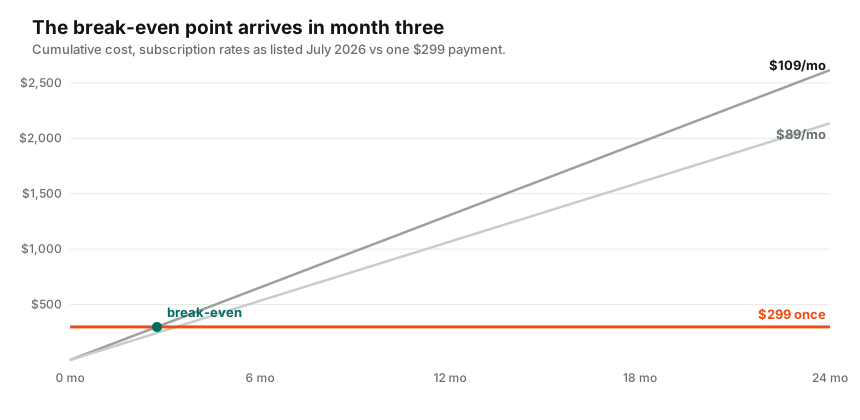
As of July 2026, Spectora's public pricing page lists $109 per month for a solo inspector, or $1,090 per year if you pay annually. Additional inspectors run $99 per month each, and the Spectora Advanced add-on is priced at $4 per published inspection on top.
Run that forward, because subscription math only hurts in the out years. Paying monthly, a solo inspector spends $1,308 a year. Over four years that is $5,232. On the annual plan, four years still costs $4,360. And the day you stop paying, you own nothing. Not the software, not always convenient access to your history, nothing.
None of that is a scandal. It is just a rental agreement, and rentals are worth re-evaluating once you notice you have paid for the house several times over.
The quieter reason inspectors look around
Consolidation. HomeGauge, the other big name, is now part of the Spectora family. When the two biggest platforms in a small industry share an owner, pricing pressure on inspectors softens, and product decisions start optimizing for the platform's revenue rather than the inspector's report.
That is also the era when report platforms start monetizing the reports themselves. Some platforms in this industry have added vendor promotions and repair-estimate upsells around the report your client reads, which means the document carrying your license can double as someone else's ad space. Read your own platform's published reports carefully, the way a client would, and decide if everything on that page is working for you.
What actually matters in a replacement
Strip the feature-grid theater and an alternative has to clear four bars.
First, the report. Your deliverable has to look at least as sharp as what you send now, or the switch costs you credibility with agents. Judge this with your eyes, not a claims page. InspectorKit publishes a full sample report for exactly this reason.
Second, the field workflow. Tap conditions, insert saved language, photo and annotate, and a summary that builds itself. If any of that gets slower, no price fixes it. The builder walkthrough shows the whole loop.
Third, your accumulated work. Years of templates and comment language have to come with you, or the switch costs a weekend you do not have. This is solvable. The import guide covers the self-serve path, and Done-For-You setup exists for the decade-deep archives.
Fourth, the exit. Whatever you choose next, confirm you can get your data out of it. A platform confident in its product makes leaving easy. InspectorKit documents its exports precisely because a promise you cannot verify is just marketing.
The InspectorKit answer, with its trade-offs
InspectorKit is a one-time purchase of $299. Report builder, editable template, comment library with a field-tested starter pack, photos with annotation, offline work in dead zones, web and PDF delivery under your brand, and re-inspections. No renewal, ever. Against Spectora's monthly plan you break even in under three months, and every month after that stays in your business.
Now the honest trade-offs, because a comparison written by the competitor is worthless without them.
InspectorKit does not do scheduling, online agreements, or payment collection. It is a report tool, built deliberately for the solo inspector who walks the house, writes the report, and sends it. If Spectora's business-management layer is load-bearing for you, you would need to replace it with something, and plenty of solo inspectors already run scheduling out of a calendar and payments out of an invoice app quite happily.
It is also built and run by one person. You get direct founder support and a product shaped by inspector feedback, and you should weigh that against the comfort of a large company. The structural protection is that everything exports, always, so your business never depends on any vendor's continued existence, including this one.
Before you cancel anything
Whatever you decide, do the exit chores while your login still works. Download PDF copies of every report you might ever get a callback on. Save your agreement templates and any client contact exports. Screenshot your template structure if no export exists, because a screenshot beats memory when rebuilding. And check your renewal date, since annual plans rarely refund the unused months and the smart move is timing the experiment to end before the renewal fires, not after.
How switching actually goes
The sane path is parallel, not cold cutover. Keep your current subscription for one more month. Run InspectorKit on two or three real inspections alongside it. Move your comment library over with the importer in an afternoon, or send your materials in and let the Done-For-You setup rebuild your account for you.
By the end of the month you have real evidence from real jobs instead of a sales page argument, and a 60-day guarantee backstops the whole experiment. If the reports do not come out sharper and faster, the refund takes one email and you have lost nothing but a test drive.
The subscription meter, meanwhile, keeps running either way. That is rather the point.
Common questions
Is InspectorKit a full replacement for Spectora?
For report writing, delivery, and the field workflow, yes. Spectora also bundles scheduling, agreements, and payment collection, and InspectorKit deliberately does not. If those bundled tools run your business, factor replacing them into your decision.
Can I move my Spectora templates and comments over?
Yes. The paste importer moves comment collections in minutes, the template editor rebuilds your structure, and the Done-For-You setup does the whole migration for you from whatever exports or old reports you can provide.
What happens to my old Spectora reports if I cancel?
That depends on Spectora's current policies, so download PDFs of your reports before canceling anything. Whatever platform you use next, keeping your own archive is just good practice.