Alternatives and comparisons
Tap Inspect alternatives, and the pay-per-report math
Tap Inspect's pay-as-you-go model looks cheap until your volume grows. The real numbers by inspection count, and where an ownership model beats both plans.
By Owen Murray, founder of InspectorKit · Updated July 6, 2026
Tap Inspect made its name with a genuinely clever idea. Instead of a subscription, pay per report, so software costs track your workload. For a brand-new inspector doing three jobs a month, that pitch lands, and it deserves a fair look before the math complicates it.
The three plans, priced honestly
As of July 2026, Tap Inspect's public pricing runs three ways. Pay as You Go at $7.50 per report, sold in blocks of 20 for $150. Unlimited at $90 per month for full-timers. And a team plan at $90 monthly plus $45 per additional inspector.
The interesting plan is the first one, because per-report pricing has a property nobody notices at signup. It scales with your success, in the wrong direction.
What per-report costs at real volume
Run the pay-as-you-go math across a career's typical volumes.
| Monthly inspections | Per month at $7.50 | Per year | Over 4 years |
|---|---|---|---|
| 3 | $22.50 | $270 | $1,080 |
| 10 | $75 | $900 | $3,600 |
| 20 | $150 | $1,800 | $7,200 |
| 30 | $225 | $2,700 | $10,800 |
A part-timer at three jobs a month pays about as much as a cheap subscription. An established solo inspector at 20 to 30 jobs pays more than any subscription in the industry, which is why Tap Inspect's own Unlimited tier exists. At $90 monthly that tier is a normal subscription, $1,080 a year and $4,320 over four years, sitting in the same band as the platforms covered in the cost landscape guide.
Every path through this pricing ends at a familiar place. Rent that never stops, sized to punish growth or capped at subscription rates.
The block-purchase detail
Pay-as-you-go on Tap Inspect is sold in blocks, 20 reports for $150, and prepaid blocks carry their own quiet economics. Money leaves your account ahead of the work, unused reports sit as breakage if your volume dips or you switch tools, and the per-block commitment nudges you to keep publishing on the platform to use up what you bought. None of that is sinister, it is standard prepaid design, but it means the real cost of leaving mid-block is the fees plus the stranded balance.
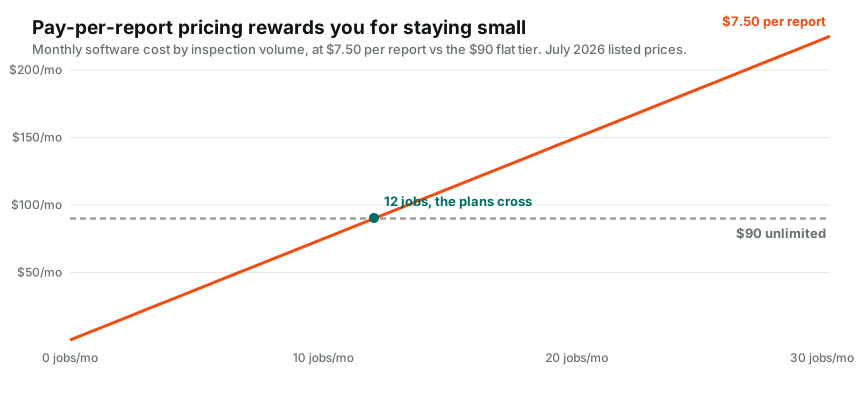
There is also a crossover point hiding in the two plans. At twelve reports a month, pay-as-you-go crosses $90 and the flat Unlimited plan becomes the cheaper rental. If you are anywhere near that line, you are no longer a pay-as-you-go customer, you are a subscriber who has not switched plans yet.
The quieter constraint, one platform's devices
Tap Inspect built its identity on iPhone and iPad, and its site leads with exactly that. If your field device is an Android phone, or your report-finishing happens on a Windows laptop, check current platform support carefully before committing, and factor what a device requirement costs when your phone breaks the morning of an inspection.
InspectorKit took the opposite bet. It runs in the browser on whatever you own, phone in the field and laptop at the desk, one account, no installs, no app store approvals delaying fixes. The offline field guide covers how browser-based survives basements and dead zones, which is the objection everyone raises first and the one the product was specifically built around.
The ownership comparison
InspectorKit is $299 once. Against pay-as-you-go, that is 40 reports' worth of fees, which a working inspector burns through in two months and a part-timer in a year. Against the Unlimited plan, break-even lands around month three and a half. In both cases everything after the crossover is money that stays in your business, permanently.
The purchase covers the parts of this job that eat evenings. A report builder with one-tap conditions and a comment library that keeps your language a tap away, photo annotation pinned to findings, a summary that assembles itself, an editable template, offline operation, and branded delivery with client and agent sending built in.
The honest trade-offs run the other direction too. There is no native app store presence, no scheduling suite, and no per-report metering that feels free while volume is low. It is a tool you buy once, shaped for the inspector who plans to still be inspecting in five years and would rather not fund a vendor's growth chart out of each job.
What stays true whichever rental you pick
One more pattern worth seeing before deciding. Every plan in this comparison, pay-as-you-go and both flat tiers, shares a property with the whole subscription market. The vendor keeps a permanent claim on your future work. Your hundredth report costs the same fee as your first, your busiest month is their best month, and the relationship never converts into something you own. The alternative model settles up once and gets out of the way of your growth entirely.
Deciding based on your trajectory, not your month
Per-report pricing asks you to bet you will stay small. A subscription asks you to bet you will stay, period. Ownership asks for one payment and takes no position on your future at all.
So decide on trajectory. If inspecting is a occasional side income and may stay that way, pay-as-you-go is not crazy, and this page will not pretend it is. If you are building a real pipeline of jobs, look at what your last three months of volume would have cost on each model, then look at the sample report and judge whether the deliverable clears your bar.
Then run the only test that counts. Real inspections through InspectorKit while your current setup still works, a 60-day money-back guarantee underneath, and your own before-and-after evenings as the verdict. Growth should compound in your bank account, not in your software bill.
Common questions
Who is pay-as-you-go actually good for?
Someone running a handful of inspections a year, genuinely part-time, who may not continue. Below roughly two inspections a month the per-report model is defensible. The trap is that success silently converts it into the most expensive option on the market.
I work on an iPad. Does InspectorKit support it?
Yes. InspectorKit runs in the browser, which means iPad, iPhone, Android, and any laptop all work with the same account and the same reports. There is no app store dependency in any direction.
Can I keep my Tap Inspect report history if I switch?
Download PDF copies of your reports before changing anything, whatever platform you choose. Your published InspectorKit reports export the same way, which is the standard any tool should meet.