Alternatives and comparisons
Inspection apps for iPhone and Android, and the app-store question
What actually matters in a field device workflow, where native apps genuinely win, and why browser-based tools quietly took over inspection reporting.
By Owen Murray, founder of InspectorKit · Updated July 6, 2026
Every inspector runs their business from a phone at least half the day, so the app question feels central. It is, just not the way app-store marketing frames it. The question that matters is not which icon you tap but what happens between the driveway and the sent report, and 2026's honest answer cuts across the native-versus-browser line in ways worth understanding before you commit a workflow to either.
What field work actually demands from a device
Strip the job to its physical reality and the requirements list is short and brutal.
One-handed operation, because the other hand holds a flashlight, a ladder rail, or an outlet tester. Big tap targets, instant condition changes, and no typing where a tap will do. Camera flow that goes from finding to attached photo in seconds, with markup that stays pinned to the finding. Survival in dead zones, since basements and crawlspaces eat signal and an edit that vanishes is a business risk, not an inconvenience. And battery frugality across a four-hour inspection day.
Notice what is absent from that list. Nothing about app stores. Every requirement is about workflow design, and both native apps and browser apps can pass or fail each one.
Where native apps genuinely win, and where the badge misleads
Fairness first. Native excels at deep hardware integration, and one segment of this market leans into it. Tap Inspect built its identity on iPhone and iPad, and an all-Apple inspector who loves that ecosystem gets a polished experience, priced per report or at $90 monthly as covered in the Tap Inspect breakdown. If your workflow is genuinely iOS-native, that is a real option with a real constraint attached, the constraint being the device wall itself.
The badge misleads in two directions, though. An Android inspector, or a mixed household, or anyone whose next phone might switch sides, inherits the platform decision their software made for them. And app-store distribution means fixes and features queue behind review processes, so the bug that bites you on Friday ships its fix on the store's schedule, not the developer's.
Why browser-based quietly took the field
The browser stopped being a compromise years ago, and inspection tools noticed. Modern mobile browsers provide the camera, storage, offline capability, and speed the field list demands, which unlocks three structural advantages no native app can match.
Every device is your device. iPhone in your pocket, Android backup in the truck, the office laptop for finishing touches, one account and the same report on all of them. When a phone dies mid-day, the job continues on whatever screen is nearest, which is a resilience story no single-platform app tells.
Updates land instantly. A fix ships when it is written, to everyone, with no store review in the middle. For a working tool that earns its keep during business hours, that latency difference is operational, not cosmetic.
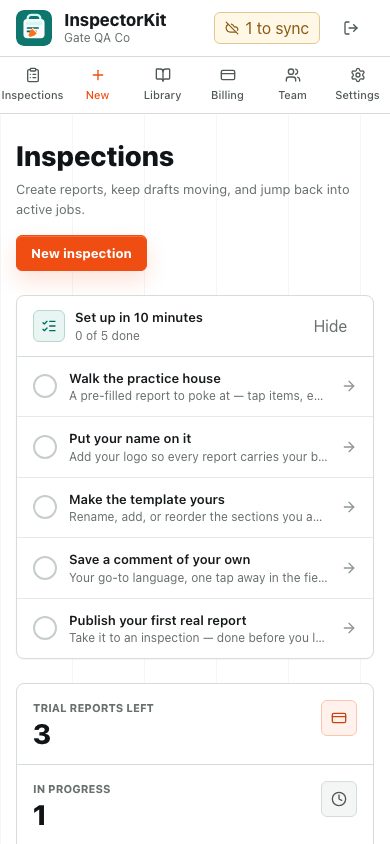
And the install question becomes optional. InspectorKit, for instance, installs to your home screen and runs full-screen like any app, while remaining reachable from any browser anywhere. The builder walkthrough shows the one-handed field loop, and none of it asked which logo is on your phone.
The offline objection, answered concretely
The traditional case for native was offline reliability, and it deserves a concrete answer rather than a wave.
InspectorKit treats the phone as the primary store. Every tap, narrative, and photo saves to the device first and syncs itself when signal returns, reloads included, with a status pill that tells you plainly what is safe where. The offline field guide documents the whole behavior, including the two moments that genuinely need signal, starting a report and publishing one, both of which naturally happen in the driveway. Test it in your own basement after purchase, with the 60-day guarantee behind you, because claims about offline deserve basements, not bullet points.
Camera habits that outlast any app
Whatever tool wins your shortlist, three camera habits raise every report. Shoot wide then close on each finding, so the reader gets location and detail in a pair. Shoot data plates straight-on before shooting the equipment, keeping model and serial legible forever. And let the software pin photos to findings at capture time rather than sorting a camera roll later, because the sorting session is where evenings go to die. The photo and annotation guide covers how pinning and markup work when the tool does its share.
The tablet question, since someone always asks
Tablets split the difference and the verdict depends on the house, not the spec sheet. An iPad or large Android tablet is superb at the desk for template edits and final review, and awkward on a ladder. Most working inspectors settle into phone-in-the-field, anything-with-a-keyboard at home, which is one more argument for a tool where the account, not the device, holds the work. A browser-based report follows you across all three screens in the same afternoon without a sync button anywhere.
Choosing, in practice
Run the decision in this order. First match the workflow to the field list above, one-handed loop, photo pinning, offline safety, using each tool's practice environment rather than its screenshots. InspectorKit seeds a practice house in every account for exactly this. Second, check the device politics, whether the tool runs on what you own now and what you might own in two years. Third, only then, compare prices, where the market table does the arithmetic and a one-time $299 sits against $79 to $109 monthly rentals.
The best inspection app for iPhone and the best one for Android turn out to be the same answer when the tool lives in the browser, which is rather the point. Your phone is your office. Software that respects that works on every phone you will ever carry, and lets the device question go back to being about cameras and cases, where it belonged all along.
Common questions
Is a native app store app better for field work?
Native wins when an app needs deep hardware access or console-grade graphics. An inspection workflow needs the camera, storage, and a fast interface, all of which modern browsers provide, which is why the app-store badge stopped predicting field quality years ago.
Does InspectorKit work on both iPhone and Android?
Yes, identically, because it runs in the browser both platforms already ship. It also installs to the home screen and works offline, so day to day it behaves like an app without the app store in the middle.
What phone should a new inspector buy for inspections?
The recent-ish one you already own, with a good camera and a case that survives crawlspaces. Device choice matters far less than workflow choice, and any tool that dictates your phone brand deserves suspicion for that alone.