Switching and migration
Rebuilding your inspection template in new software, a craftsman's guide
A template rebuild is the one chance to fix a decade of workarounds. Walk-order design, helper text, what to add, what to kill, and the two-job tuning method.
By Owen Murray, founder of InspectorKit · Updated July 6, 2026
A template is not a form. It is your inspection process, written down, and most inspectors are running processes shaped by whatever their first software allowed a decade ago. The rebuild that comes with switching tools is annoying exactly once, and it is also the only moment you will ever redesign your process on purpose. This guide treats it that way.
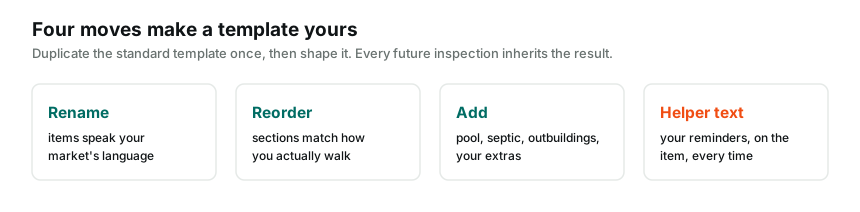
Start from the blueprint, not from memory
Before touching any editor, get your old structure in front of you. An exported template document if your old platform provides one, per the export door map, or two recent reports if it does not, since a finished report displays your structure completely.
Then annotate it like an inspector, because that is what you are. Mark the sections you always fill, the items you skip on every job, the findings you write in the wrong section because the right one never existed, and the order mismatches where the template's sequence fights the way you physically walk a house. Fifteen minutes of honest annotation produces the actual rebuild spec, and it is never identical to the old template.
Walk-order design, the part that pays daily
The single highest-value design decision is sequence. Your template should match your physical path through a property, because every mismatch costs a scroll-and-search in the field, forty times per job.
Most solo inspectors converge on some version of outside-in. Roof and exterior while the light is good, grounds and grading on the way around, then garage, then interior systems, then room-by-room, then attic and crawlspace in whichever order your market's houses demand. Whatever your version is, the template editor reorders sections in seconds, so encode your real path, not the alphabetical order or the association checklist sequence your old tool shipped with.
One structural trick worth stealing. Group by where you stand, not by trade taxonomy. A water heater lives in plumbing taxonomically, but if yours is inspected during the garage pass, a garage-section item saves you a navigation round-trip on every single job. Purists object. Purists are not standing in your garage at 4 pm.
Helper text, the layer most rebuilds skip
Each item in a good template carries a short helper line, the gray reminder under the item name that only you see. This is where a rebuild moves your mental checklist out of your head.
Check data plate age. Note panel manufacturer. Photograph TPR discharge termination. Confirm GFCI at exterior receptacles. Each helper is one less thing memory has to carry, and memory under time pressure is where findings get missed. Write helpers for the items where you have ever forgotten something, which you know, because those are the memories that sting.
What to add, what to kill
Rebuilds fail in two directions, so here is the calibration.
Add the sections your market actually demands. Irrigation in the sunbelt, wood stoves in the north country, docks on lake properties, casitas and ADUs where zoning breeds them. If you write the same out-of-scope disclaimer or shoehorned finding monthly, that is a missing section announcing itself.
Kill with equal confidence. The commercial-ish items that came stock and never once applied, the duplicate coverage between sections that makes you decide where a finding lives every time, the granularity that turns one roof into eleven items when four carry your actual reporting. Every dead item is a tap you pay on every job, and the two bulk buttons only mark what exists.
The volume rule from library migration applies here too. A tight template beats a comprehensive one, because comprehensiveness that does not match your practice is just friction wearing a thoroughness costume.
The two-job tuning method
Build the structure in one evening, then stop. Deliberately, and against every perfectionist instinct.
Run your next two real inspections on it, and keep a running note of every friction moment, the item you hunted for, the section that interrupted your path, the helper you wished existed. After job two, spend fifteen minutes in the editor applying the notes. This cycle, jobs then tweaks, converges on a genuinely tuned template in about two weeks, and no amount of pre-launch planning reaches the same result, because the job site knows things the desk does not.
Changes apply only to new inspections, existing reports keep their structure, so mid-stream tuning never mangles anything a client holds. That safety is what makes the method work.
Standards mapping, the rebuild's quiet insurance
While the structure is open on the bench, do the mapping pass most inspectors postpone forever. Put your standards of practice next to your rebuilt template and confirm every required system has a home, item by item. Where a standard names something your market never sees, keep the item anyway with a helper note, since not applicable observed is a finding and a missing item is a gap. The exercise takes twenty minutes during a rebuild and hours of reconstruction if a complaint ever demands it retroactively. A template that visibly maps to your standards is the cheapest professional armor you will ever build, and the rebuild is its natural moment.
Export the result, close the loop
When the template settles, export it as a PDF and file it with your records. The document is your process, written down, useful as a training aid if you ever add help, as standards-mapping documentation if coverage is ever questioned, and as the blueprint for whatever rebuild the distant future holds.
Your template took years to evolve and one evening to rebuild better. That ratio is the whole case for treating a forced rebuild as the gift it quietly is.
Common questions
Should I rebuild my template exactly as it was?
No, and this is the rare professional opinion this site will state flatly. Your old template accumulated workarounds for your old software's limitations. Rebuild the walk order and coverage you actually want, and let the fossils stay buried.
How long should a template rebuild take?
One evening for the structure, then five-minute adjustments across your first few real jobs. Inspectors who spend three weeks perfecting a template before job one are procrastinating with extra steps, and the jobs teach faster than the planning.
What if my state or association requires specific coverage?
Your standards of practice define minimum coverage, and your template should map to them item by item. That mapping is your defense documentation, so build it in deliberately and keep the exported copy with your records.