Alternatives and comparisons
Home inspection report software compared on what you can verify
A comparison built from checkable facts only. Pricing models, four-year totals, device requirements, and data-exit terms for the tools inspectors shortlist.
By Owen Murray, founder of InspectorKit · Updated July 6, 2026
Comparison pages in this industry mostly compare marketing departments. Twenty columns of checkmarks, every vendor greenlit for ease of use, and a winner that correlates suspiciously with whoever runs the affiliate program. This page takes the opposite constraint. Only dimensions a stranger can verify from public information, dated July 2026, with the judgment calls left where they belong, on your job site.
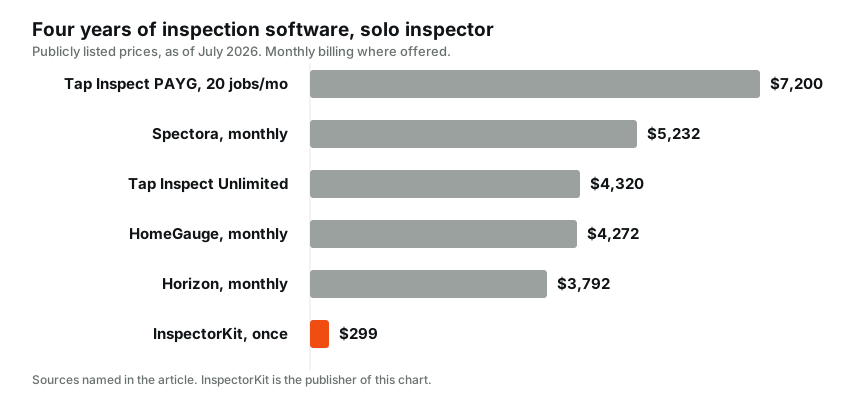
The verifiable table
| Tool | Model | Listed solo price | 4-year cost | Field device | Extra seats |
|---|---|---|---|---|---|
| Spectora | Subscription | $109 per month | $5,232 | Web and mobile apps | $99 per month each |
| HomeGauge | Subscription | $89 per month | $4,272 | Desktop writer plus companion app | Varies by setup |
| Horizon | Subscription | $79 per month | $3,792 | Web-based | All-in pricing |
| Tap Inspect | Per report or $90 per month | $7.50 per report | $4,320 unlimited | iPhone and iPad centered | $45 per month each |
| InspectorKit | One-time | $299 once | $299 | Any browser, phone to laptop | Optional monthly add-on |
Four-year figures use monthly billing where both exist, and annual billing trims them without changing the ranking. Per-report four-year cost depends entirely on volume, running $1,080 at three jobs a month and $7,200 at twenty, the full curve lives in the Tap Inspect breakdown.
Disclosure sits right under the table where it belongs. InspectorKit is my product, the one-time row. Every other figure comes from the named vendor's public pricing, and checking my arithmetic takes five minutes of your own browsing.
The column vendors leave out, data exit
Every platform in this market will tell you how easy it is to start. The comparison that matters at year three is how easy it is to leave, so ask it of each shortlisted tool while you are still a prospect, when sales teams answer fastest.
The questions are standard. Do published reports export as PDFs in bulk or one at a time. Does the template structure export in any usable form. Does the comment library leave as text, or at all. Does report access survive cancellation, and for how long. InspectorKit publishes its export answers as documentation rather than a sales-chat promise, reports as print-ready PDFs, template and library as clean documents, no plan gates. Hold every vendor to that shape of answer, in writing, and weight silence appropriately.
The support column, tested in one email
Support quality is verifiable, just not from a table. Send each finalist a real pre-sales question, something specific like what happens to my report archive after cancellation, and start a timer. The speed, the directness, and whether a human with product knowledge answers are the support experience you are buying, previewed for free. InspectorKit's version of this test is answered by the founder, which is either a feature or a risk depending on your taste, and the FAQ addresses that trade-off head on rather than hiding it.
The columns that resist tables
Three dimensions decide more than price and refuse to fit in cells, so here is how to test each in under an hour.
Report quality is judged by the document, not the demo. Every serious vendor publishes samples. Open theirs, open the InspectorKit sample report, open one of your own, and read all three on a phone the way an agent does between showings. Summary clarity, photo placement, and whether the document looks like it came from a professional. Twenty minutes, decided.
Field speed is judged standing up. The tap-condition-insert-comment-photo loop either flows one-handed or it does not, and no video proves it either way. InspectorKit's builder tour describes its loop, and ten minutes in the practice house beats any description.
Reliability without signal is judged in a basement. Some tools degrade gracefully offline, some quietly lose work, and the difference is a business risk, not a feature checkbox. Ask each vendor precisely what happens to edits made with zero bars, then reload. The offline field guide is InspectorKit's answer, written down and testable.
When to redo this comparison
Software choices deserve a shelf life. Recheck the market when your renewal notice lands, when your volume crosses a pricing threshold like the per-report crossover, or when your current vendor changes hands, since ownership changes rewrite roadmaps and pricing discipline. Otherwise, stop comparing and go inspect. Tool research past the decision point is procrastination wearing a productive costume.
One row this table cannot hold, the practice run
Every tool above claims a fast field workflow, and a table cell cannot arbitrate. What can is a pre-loaded report you are allowed to break. InspectorKit seeds every account with a practice house, a half-finished inspection you can tap through, edit, and publish in your first five minutes without anything counting against you. Whatever tool you shortlist, look for the equivalent, because a vendor confident in their workflow hands you the controls immediately, and a vendor who routes you to a scheduled demo call is telling you something too.
Reading any comparison, including this one
Three habits keep comparison shopping honest. Check the date on every price, because subscription pricing drifts and stale comparisons flatter whoever raised prices most recently, this page is stamped July 2026 for exactly that reason. Follow the money behind the page, affiliate-funded rankings and vendor-owned pages, this one included, deserve the same discount, which is why everything above routes to verifiable sources instead of trust. And convert everything to four-year totals before comparing, since monthly framing is designed to make renting feel small.
Then close the tabs and run the only comparison with authority. One real inspection, your finalist against your current tool, evenings counted. The use-case rankings will shortlist honestly, this table fact-checks the shortlist, and the job site issues the verdict.
Common questions
Why does this comparison have so few columns?
Because columns you cannot verify are decoration. Pricing, billing model, device requirements, and export terms are publicly checkable. Ease of use and report quality are real but personal, so this page routes you to testing them instead of scoring them.
Where are the star ratings?
Skipped on purpose. Aggregated stars mostly measure how aggressively a vendor solicits reviews. One real inspection through your finalist tells you more than a thousand strangers' averages.
Which single row should I start with?
Match your situation to the use-case guide first, then come back here for the fact check on your finalist. Comparisons work best as verification, not as discovery.