Templates and resources
The residential inspection template, a full walkthrough
A section-by-section tour of InspectorKit's standard residential template, why it is ordered the way you walk, and how to make it yours.
By Owen Murray, founder of InspectorKit · Updated July 6, 2026
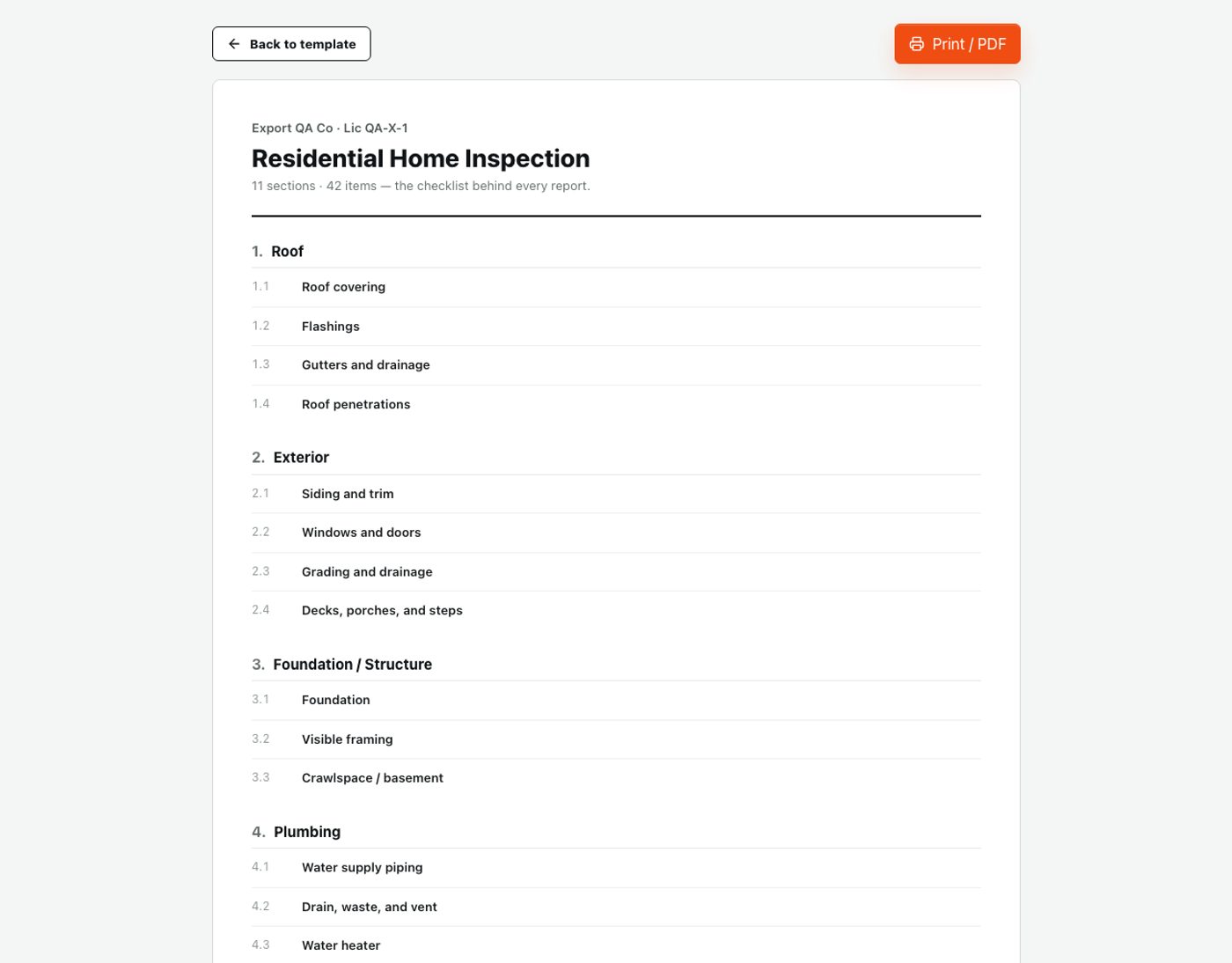
Every report you publish is shaped by a decision made before the inspection started, the template. It sets what you walk past, what you cannot forget, and how findings organize themselves for the reader. InspectorKit ships with one standard residential template, eleven sections and 42 items, and this is the tour, what is in it, why it is ordered the way it is, and where to bend it.
The ordering principle, walk order beats category order
The template runs roof to garage because that is a defensible physical path through a property, outside and up first, then systems, then interior rooms, then the garage on the way out. Templates organized by abstract category force the inspector to jump around the document while walking a continuous path, and every jump is a chance to lose an entry.
Walk order also means the report assembles itself in the sequence the inspection actually happened, which does the field workflow a quiet favor, the current section is almost always the open section, and the find box covers the exceptions when a garage finding announces itself from the kitchen window.
The exterior arc, sections one through three
Roof opens the template with four items, covering, flashings, gutters and drainage, penetrations. Four is enough because each item is a workspace, Roof covering holds every shingle observation, wear pattern, and patch job as findings within it rather than demanding a line per possibility.
Exterior follows, siding and trim, windows and doors, grading and drainage, and decks, porches, and steps. The grading item earns its placement out here rather than under foundation, water arrives at the foundation from the outside, and the drainage narratives that fill this item are among the most-used writing in residential work.
Foundation and structure closes the arc with foundation, visible framing, and the crawlspace or basement item, the section where the offline capability of your tool gets tested more than anywhere else in the house.
The systems block, four through six
Plumbing, electrical, and HVAC form the mechanical core. Plumbing splits into water supply piping, drain-waste-vent, water heater, and fixtures, with the water heater as its own item because it generates its own findings, the relief valve discharge, the strapping, the age question, reliably enough to deserve a dedicated home.
Electrical covers service equipment, the panel, branch wiring, and devices, the section where safety findings concentrate and where the GFCI and AFCI narratives do their work. HVAC rounds out the block with heating, cooling, distribution, and venting, aging-equipment capital of the template.
The systems block is where condition calibration matters most, since these are the findings that carry repair-cost weight in the negotiation, and consistent marginal-versus-defect language across these sections is what agents quietly grade you on.
The interior sweep, seven through eleven
Interior handles the whole-house surfaces, walls, ceilings, floors, doors, while Kitchen and Bathrooms get their own sections because their fixtures, appliances, and moisture exposure produce room-specific findings that deserve room-specific homes. Attic covers structure, insulation, and ventilation, the section most likely to hold the photos nobody else in the transaction has ever seen. Garage closes the walk with the door, the opener and its safety reverse, and fire separation, a small section with an outsized share of safety findings.
Eleven sections, 42 items, and a full standard residential inspection has a numbered place for everything it produces.
Making it yours, the editing layer
The standard template is a starting point with opinions, not a cage. The template editor lets you add sections, rename items, reorder to match how you actually walk, and write helper text that rides along on any item, your own reminder about what the item covers, visible every time you open it.
Market realities drive most edits. Pool country adds a pool section, septic country adds septic observations, snow country extends the roof items. The checklist-by-room guide maps what each section should catch, which doubles as a review list when tuning the template to your standard of practice.
Two editing habits keep the template healthy. Extend rather than fragment, a new finding type usually belongs inside an existing item as a narrative rather than as a new micro-item, because item count is scroll cost in the field. And export the template once a year, the printable version above doubles as an SOP-compliance review document and a training artifact if you ever bring help.
Helper text, the underused layer
Between the structure and the findings sits a layer worth deliberate use, the helper text each item can carry. It appears every time the item opens, which makes it the right home for the reminders that memory drops on tired days, check the discharge pipe termination on the water heater item, note ledger flashing on decks, photograph the data plate on HVAC equipment. Veterans use it to encode their own hard-won catches, new inspectors use it as a built-in mentor, and anyone can start with a handful of lines on the items that have bitten them before. Helper text never appears in the client's report, it is scaffolding for the walk, and five minutes spent writing it after a near-miss converts one lesson into permanent infrastructure.
The template as an asset
Like the comment library, a tuned template is accumulated judgment, your market, your SOP, your walking rhythm, encoded once and applied to every job after. It is also yours to keep, exportable in full, which is the data-ownership stance applied to structure rather than words. Tune it in your first month, revisit it twice a year, and every inspection you ever run inherits the improvements automatically.
Common questions
Can I add sections the standard template does not have?
Yes, the template editor handles it. Pools, outbuildings, septic observations, wood stoves, whatever your market serves up regularly deserves a permanent section. Duplicating the standard template and extending it keeps the base intact while your working version grows with the business.
Why 42 items instead of the 200-line checklists some tools ship?
Because items are workspaces, not checkboxes. Each item holds conditions, narratives, and photos for everything it covers, so Roof covering absorbs shingles, wear patterns, and previous repairs in one place. Four hundred micro-items look thorough on paper and produce scroll fatigue in a crawlspace. Findings-per-item is the structure that survives fieldwork.
Does the template meet my state's standards of practice?
It covers the systems the major standards of practice address, and state requirements vary enough that you should verify against your own SOP line by line. The editor makes any required addition a five-minute job, and the export makes the whole checklist reviewable in one printable document.